The vCard specification has a PHOTO field. You can put an image straight into a contact card, encoded as text, and a QR code can carry it. People ask for this constantly, usually for a business card or a conference badge, and most answers online are either "yes you can" or "no you cannot", with nothing behind either.
So we measured it.
The short version: a 32 pixel thumbnail, smaller than an emoji, takes a vCard code from 45 by 45 modules to 125 by 125. That needs about 53 mm of printed width, which is wider than a business card is tall. A photo at any sensible size does not fit in a QR code at all.
The short answer
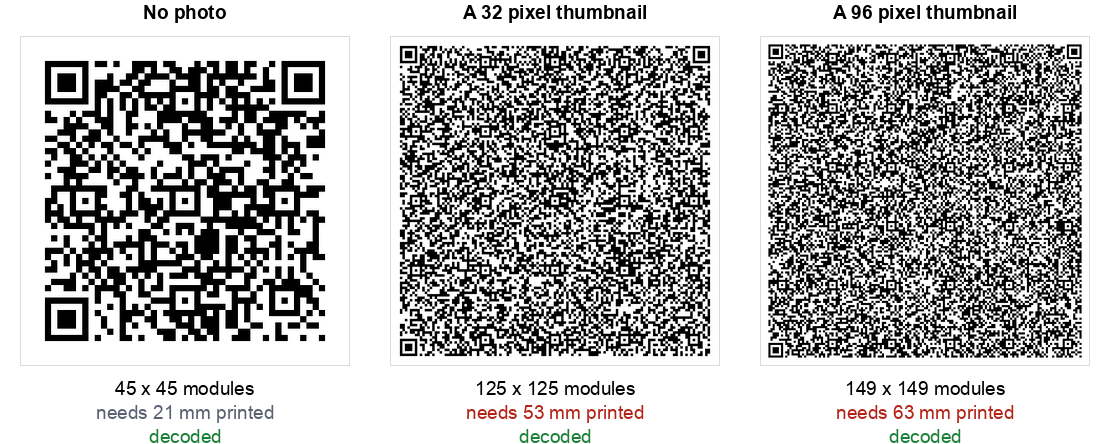
What a photo costs, measured
| The vCard contains | Chars | Grid | Min printed width | Decoded |
|---|---|---|---|---|
| Name, phone, email, company | 121 | 45 x 45 | 21 mm | Yes |
| + a 32 px thumbnail | 1,077 | 125 x 125 | 53 mm | Yes |
| + a 48 px thumbnail | 1,165 | 129 x 129 | 55 mm | Yes |
| + a 64 px thumbnail | 1,301 | 137 x 137 | 58 mm | Yes |
| + a 96 px thumbnail | 1,641 | 149 x 149 | 63 mm | Yes |
| + a 150 px photo | 2,589 | Does not fit in a QR code at all | ||
Every one of those that fits does decode, on a clean digital image at full resolution. That is worth saying plainly, because the failure here is not "the code is broken". The code is perfectly valid. The problem is entirely about what happens when you print it.
A printed QR module needs roughly 0.4 mm before ink spread and camera focus start working against it, and every code needs a four module quiet zone on each side. So a 125 by 125 grid needs (125 + 8) x 0.4, which is 53 mm. A business card is 55 mm tall. You would be printing a code that fills the entire card, for a thumbnail nobody can see.
Put that next to the alternative. The same contact details with no photo fit in 21 mm, and a link to a contact page fits in under 15 mm. We worked through those numbers in our business card guide. A photo costs you more printed area than everything else on the card combined.
The hard ceiling nobody mentions
The 150 pixel row is not a judgement call. It is a hard limit of the format.
QR codes stop at version 40, which is a 177 by 177 grid, and that is the largest QR code that exists. Its capacity depends on the error correction level:
| Error correction | Maximum bytes at version 40 |
|---|---|
| L, lowest | 2,953 |
| M, the common default | 2,331 |
| Q | 1,663 |
| H, highest | 1,273 |
Our 150 pixel photo produced a 2,589 character vCard. At level M that is past the ceiling, and the encoder refuses: there is no version 41 to grow into. You would have to drop to level L, giving up almost all error correction, to fit it into a 177 by 177 code needing about 74 mm of print.
At level H, the level you would want for anything carrying a logo or destined for wear, the whole budget is 1,273 bytes. That is smaller than our 48 pixel thumbnail. A photo and error correction are close to mutually exclusive.
Why a photo is so expensive
Two multiplications stack up, and that is what surprises people.
First, an image has to be turned into text to live inside a vCard, using base64. That encoding is about a third larger than the raw file. A 750 byte JPEG becomes roughly 1,000 characters.
Second, a QR code grows in fixed version steps, and each step adds four modules to every side. Going from 121 characters to 1,077 is not a small nudge along a curve, it is roughly twenty version steps, and the printed area grows with the square.
So a thumbnail that is 1 KB as a file, which sounds like nothing, is eight times the entire rest of the contact card once encoded, and the code that carries it has almost eight times the area.
What to do instead
Everyone asking this wants the same outcome: the person who scans your card ends up with your face next to your name in their phone. There are two honest ways to get that, and neither involves putting the image in the code.
- Point the code at a contact page you control. The page can show the photo at any size and offer a downloadable contact file that includes it. The code itself stays at the 2 cm (0.8 in) minimum because it only carries a short URL. This is the approach we would use for anything printed.
- Use a plain vCard code and let their phone find the photo. Save a contact with an email address and most phones will pull a profile picture from the linked account or from the person's own address book sync. You get the photo without paying for it in millimetres.
There is a third option people try that we would avoid: putting your photo next to the code on the card, and a plain vCard inside it. That is fine, and it is what most well designed cards already do. It just is not the same thing as a photo in the code, and it works precisely because the photo is not in the code.
Our vCard generator deliberately does not offer a photo field, for the reasons above. If you want to test any code you have made, including one from another tool with a photo in it, our stress test will show you how much blur and how small a print it survives.
How to make a vCard QR code with a photo
Our vCard QR code generator deliberately has no photo field, for the size reasons below. You can still build a code with a photo, because a vCard code is just text, and our text QR code generator encodes exactly what you paste. We tested that on the live page with a multi-line vCard containing a photo line, and the code read back identical to what we pasted.
Step 1: Choose how the photo is attached
This is the decision that sets the size. The measurements above show what each route costs.
Step 2: Write the contact text
For the link route, a complete card looks like this:
BEGIN:VCARD
VERSION:3.0
FN:Sarah Mitchell
N:Mitchell;Sarah;;;
ORG:Northgate Design
TEL;TYPE=CELL:+14155550142
EMAIL:sarah@northgate.design
PHOTO;VALUE=uri:https://northgate.design/sarah.jpg
END:VCARD
The PHOTO;VALUE=uri: line followed by the picture's address is the part that adds the photo. The format allows it. Whether a particular phone then goes and downloads that picture when it saves the contact is something we have not tested, so check on the devices that matter to you.
Step 3: Generate the code
Paste the finished text into the text generator and download the code. Use PNG for screens and SVG if anything is going to a printer.
Step 4: Scan it back and test on a phone
Read the code with a plain QR scanner first and check the text for typos. Then scan it with a phone, save the contact, and open the saved entry to see whether the name, number and photo all landed. Do this before anything is printed.
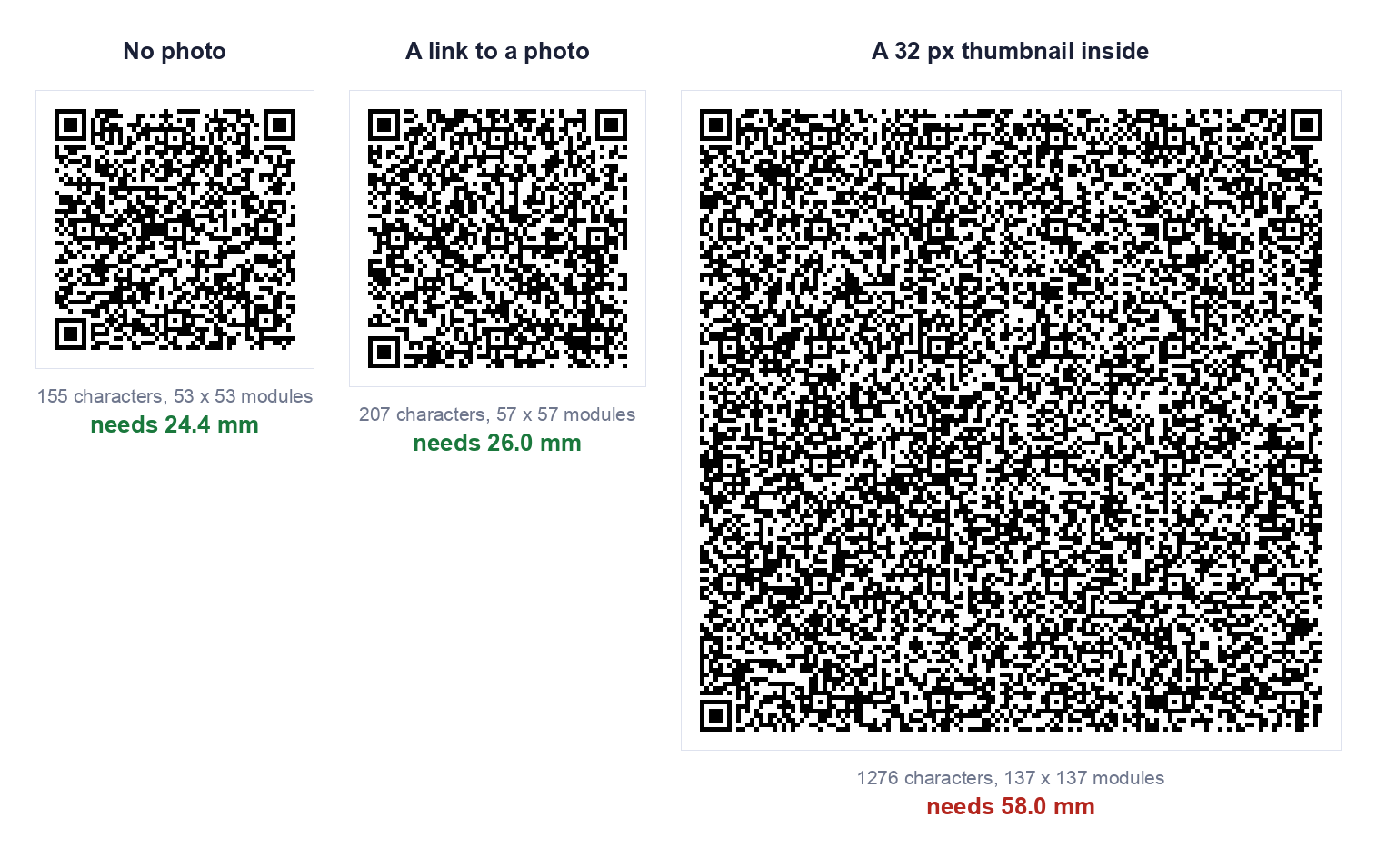
How we tested this
- The same contact card throughout, name, mobile, email and company, so the only variable was the photo.
- JPEG thumbnails at five sizes, base64 encoded into the vCard
PHOTOfield exactly as the format specifies. - Error correction level M, the common default, except in the capacity table which lists all four.
- Grid sizes read from the encoder, so they are exact, and the 150 pixel case is the encoder refusing rather than our judgement.
- Every code decoded back with jsQR and compared character by character against the input. All the ones that fit matched.
- Printed widths calculated at 0.4 mm per module plus the quiet zone.
Two honest limits. The 0.4 mm floor is a common working figure for laser printing rather than something we measured on a press. And our test images are synthetic gradients rather than real portraits, so a real face may compress slightly better or worse, which moves the character counts by a little and the conclusion by nothing.
The summary
You can put a photo in a vCard QR code. The specification allows it, the encoder will do it, and the result decodes. It is still the wrong thing to do, because the code you get needs more printed space than the card it was meant to go on.
A 32 pixel thumbnail costs you 32 mm of extra printed width. Point the code at a page with the photo on it instead, and keep the code near the 2 cm (0.8 in) minimum.
If you want the contact card itself, our vCard QR code generator builds one from the fields that are worth carrying, and our business card guide has the millimetre by millimetre breakdown of what each field costs.
Frequently asked questions
Can a vCard QR code hold a photo?
A very small thumbnail can be embedded, but it makes the code several times larger. In our test a 32 pixel thumbnail took the code from 24.4 mm to 58.0 mm. A photo of ordinary size does not fit in a QR code at all.
Will the photo show up when someone saves my contact?
That depends on the phone and on how the photo was attached. We did not test this across devices, so we cannot promise it. Scan your own finished code on the phones that matter to you and open the saved contact.
What is the easiest way to get my photo in front of people?
Print it beside the code on the card, or link to a contact page that shows it. Both give people your face without asking the code to carry it.
Can I put a picture in the middle of the QR code instead?
That is a logo, not contact data. It covers some of the code's modules and uses up error correction, so it needs a higher level and a check that the code still reads. Our custom QR code generator decodes the styled code after each change and tells you whether it still scans.
What format does a vCard QR code use?
It uses the vCard text format, the same one a phone exports when you share a contact. The text starts with BEGIN:VCARD and VERSION:3.0, then one line per field, such as FN for the display name, N for the name in parts, ORG, TEL, EMAIL and URL, and it ends with END:VCARD. Version 3.0 is the safer default for compatibility, and it is what our vCard generator writes. A PHOTO line can be added in the same format, as shown in step 2 above.
Does a vCard QR code expire?
A static one does not. It is a printed pattern holding the contact text, with nothing behind it that can lapse.
Can I change the details after printing?
No. A static code cannot be edited. If your details may change, link to a page you control and update the page instead.
Is it free to make a vCard QR code?
Yes. Our vCard generator and text generator are free, need no signup, and build the code in your browser, so nothing you type is uploaded.