How we wrote this
We are a competitor, so you should know the ground rules. QRotto is not affiliated with QRStuff. Everything below about QRStuff comes from two pages on its own site, the homepage and the pricing page, which we read on 3 October 2026. Where we quote it, we quote the page.
We did not create a code with QRStuff for this article, so we make no claim about how its generator behaves in use. Pages change, so treat this as a snapshot and check the live pages before you decide anything.
What QRStuff does
QRStuff is a QR code generator with a free tier and paid plans. Its homepage lists more than 50 content types, including website links, WiFi, vCard, PDF, pictures, video, audio, text, email, phone, SMS, location and a range of social profiles.
It also separates two kinds of code, and this is the single most important thing to understand about it. In its own words, static codes "permanently encode data directly into the QR code image" and "never expire and work offline", while dynamic codes use a short redirect address, which lets you edit the destination and track scans.
If those two terms are new, our guide to static and dynamic QR codes explains the difference, and why it decides whether a printed code keeps working.
The free route, as QRStuff describes it
The homepage says you can create a code without signing up, and says static codes are free to create, download and use "forever with unlimited scans", with no watermarks or expiration dates. Its comparison table lists custom colours and logo branding as included in the free column.
The same table lists two limits on that free column. Dynamic codes are shown as not included, and the downloadable file is listed as PNG only, while high resolution PNG, SVG, EPS and PDF files are shown against the paid columns.
That matters if the code is going to a printer. QRStuff's own homepage recommends vector formats such as SVG, EPS or PDF for professional printing, because a vector file stays sharp at any size. In our own testing of what to check in an online QR code generator, a low resolution file did not stop a code scanning, but it did make the printed edges soft. If sharp print matters to you, check which file you actually receive.
The paid plans
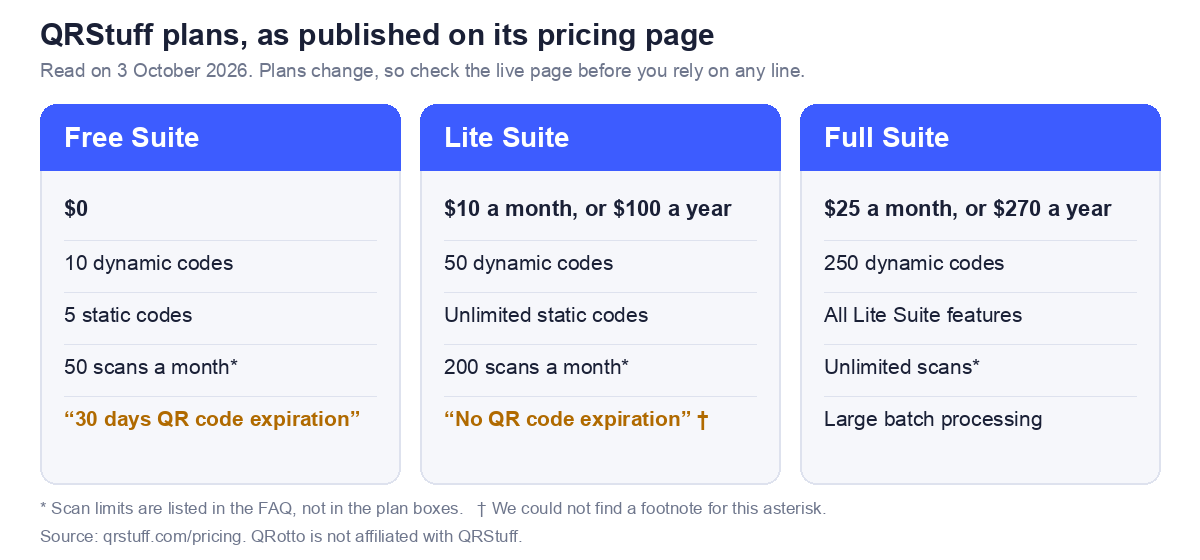
QRStuff lists a Free Suite at $0, a Lite Suite at $10 a month or $100 a year, a Full Suite at $25 a month or $270 a year, and an Enterprise plan above those. Dynamic codes, scan analytics and editing a destination after printing sit on the paid side. Its pricing FAQ says editing a printed code's destination is available to Lite, Full and Enterprise.
None of that is unusual. It is how most dynamic code services are priced. What is worth your attention is the detail that follows.
Six things to check before you print
1. Is your code static or dynamic?
This decides everything else. QRStuff's own pricing FAQ answers the question people most want answered. Asked whether codes expire if you cancel, it says: "Static QR codes are permanent and will never expire. However, Dynamic QR codes require an active subscription to remain functional, as they rely on our redirect servers to allow for URL editing and real-time scan tracking."
That is a clear and honest statement, and it means the same thing on any dynamic code service. A dynamic code is only as durable as the subscription behind it. If you print one on a thousand cards and later stop paying, the redirect stops.
2. Do the free plan's numbers agree with each other?
On the pages we read, they do not obviously line up, and you should settle this before relying on a free code.
- The homepage says static codes are "free forever" with unlimited scans, and the table introduction adds that every plan "keeps your static QR codes working forever". The pricing page's Free Suite lists "5 Static QR codes".
- The homepage comparison table shows dynamic codes as not included on the free plan. The pricing page's Free Suite lists "10 Dynamic QR codes".
- The Free Suite also lists "30 days QR code expiration". The page does not say which codes that applies to.
These may all be consistent. The free Suite could be a separate offering from the no sign up static codes, and the 30 days could apply only to its dynamic codes. We cannot tell from the pages. What we can say is that a reader looking at both pages could reasonably come away unsure whether a free code expires, and the sensible response is to ask before you print.
3. What happens at the scan limit?
The FAQ says the Free Suite includes 50 scans a month and the Lite Suite 200, with Full and Enterprise unlimited. A poster in a busy place can pass 50 scans in a day. The pages we read do not say what a visitor sees when a code reaches its limit, so find that out first. The homepage states separately that static codes have unlimited scans.
4. What does the asterisk say?
The Lite Suite lists "No QR code expiration*". We could not find a footnote explaining the asterisk on the page. An asterisk usually means a condition, and it is worth finding out what it is.
5. Where is the code made, and who sees your data?
QRStuff's homepage says that for static codes it does "not track scan data or store user information", and that dynamic codes provide anonymised analytics. We did not test where the code image is built. You can check for yourself in a minute: load the page, switch off your internet connection, and try to make a code. If it still works, the code is built on your device. Our guide to online QR code generators explains why this matters most when you are typing something private, such as a WiFi password.
6. Test the finished code like a stranger would
Whatever generator you use, do this before printing. Open the link in a private browsing window, scan the code with a phone on mobile data rather than your own WiFi, and read the text back with a plain QR scanner to check what is inside. It takes about a minute and it catches most of what goes wrong. We cover the common failures in why QR codes fail to scan.
Where our own tools differ
Since you are reading this on a QR generator's site, here is what we do and do not offer, plainly.
| QRotto | QRStuff, per its pages | |
|---|---|---|
| Code type | Static only | Static and dynamic |
| Account | None | Not needed for static codes; needed for dynamic |
| Editing a printed code | Not possible | Dynamic codes, paid plans |
| Scan analytics | None | Dynamic codes, paid plans |
| Content types | 18 generators | 50 or more |
| Where the code is built | In your browser | Not tested by us |
| Cost | Free | Free tier and paid plans from $10 a month |
If you need to edit a destination after printing, or see how many people scanned, that is what dynamic codes are for, and a service like QRStuff offers them. If you want a code that cannot expire because nothing sits behind it, a static code does that, and there are several free generators that make them. A third option for anyone with their own domain is a static code pointing at a short path you control, which you can redirect later. We describe it in static vs dynamic QR codes.
Common questions
Is QRStuff free?
Its homepage says static codes are free to create, download and use. Dynamic codes, scan analytics and vector downloads are listed on paid plans, which start at $10 a month on the pricing page we read. The Free Suite on that page lists some dynamic codes, so check the current terms.
Do QRStuff QR codes expire?
QRStuff says static codes never expire and that dynamic codes require an active subscription to keep working. Its pricing page also lists "30 days QR code expiration" under the Free Suite without saying which codes it covers. Ask before printing.
Do I need an account to use QRStuff?
The homepage says you can create codes without signing up. It also says free accounts add saved codes, and it invites you to sign up to create dynamic codes.
Can I download an SVG for free?
Its homepage comparison table lists PNG only for the free column, with SVG, EPS and PDF on paid plans. Plans change, so confirm on the live page.
What is the difference between a static and a dynamic code?
A static code holds your data and nothing else, so it cannot be edited and cannot expire. A dynamic code holds a short address on the provider's server, which redirects to your destination. That makes it editable and trackable, and it also makes it depend on the provider. We explain it in full in our static vs dynamic guide.
Which should I choose for a printed code?
If the destination will never change, a static code is the safer choice, because nothing can lapse. If you may need to change it, use a dynamic code or a short path on your own domain, and decide up front who owns the redirect.
Sources
Information about QRStuff on this page was read from qrstuff.com and qrstuff.com/pricing on 3 October 2026. QRotto is not affiliated with QRStuff. If anything here is out of date or wrong, tell us through the contact page and we will correct it.