The short answer
A QR code writer is a QR code generator
People search for a "QR code writer" when they want to make a QR code. The words writer, generator, maker and creator all mean the same tool: you type in some information, and it draws the code. There is no difference in what comes out.
What "write" really means
A QR code is drawn, not written to. It is a printed pattern that holds a piece of text, and once it is printed that text cannot be rewritten. That is why the writing step matters: you want the text right before it goes on paper.
The three steps
- Choose what the code should do.
- Write the details it should hold.
- Download it and test it.
Step 1: Choose what the code should do
Pick the type that matches the job
Every type of code holds text, but each follows its own format, so the phone knows what to do with it. A link opens a page, a WiFi code joins a network, a contact card offers to save a person. Pick the generator that matches the job.
| You want people to | Use |
|---|---|
| Open a web page | URL generator |
| Join your WiFi without typing a password | WiFi generator |
| Save your contact details | vCard generator |
| Email you, text you or call you | Email, SMS or Phone generator |
| See a place on a map | Location generator |
| Add an event to a calendar | Event generator |
| Read a short message | Text generator |
If your type is not in the list
We also have generators for PDFs, images, Google Drive files, social profiles and more. For anything without its own form, the text generator below does the job.
Step 2: Write what goes inside
Type the details into the form
Each generator asks only for what its type needs. A WiFi code wants a network name and a password. A text message wants a number and a message. You type them in and press Generate, and the code appears straight away. It is built in your browser, so nothing you type is uploaded.
What actually gets written inside
We ran nine of our generators on the live site, typed sample details, and decoded each finished code to see the text it holds. Here are four of them.
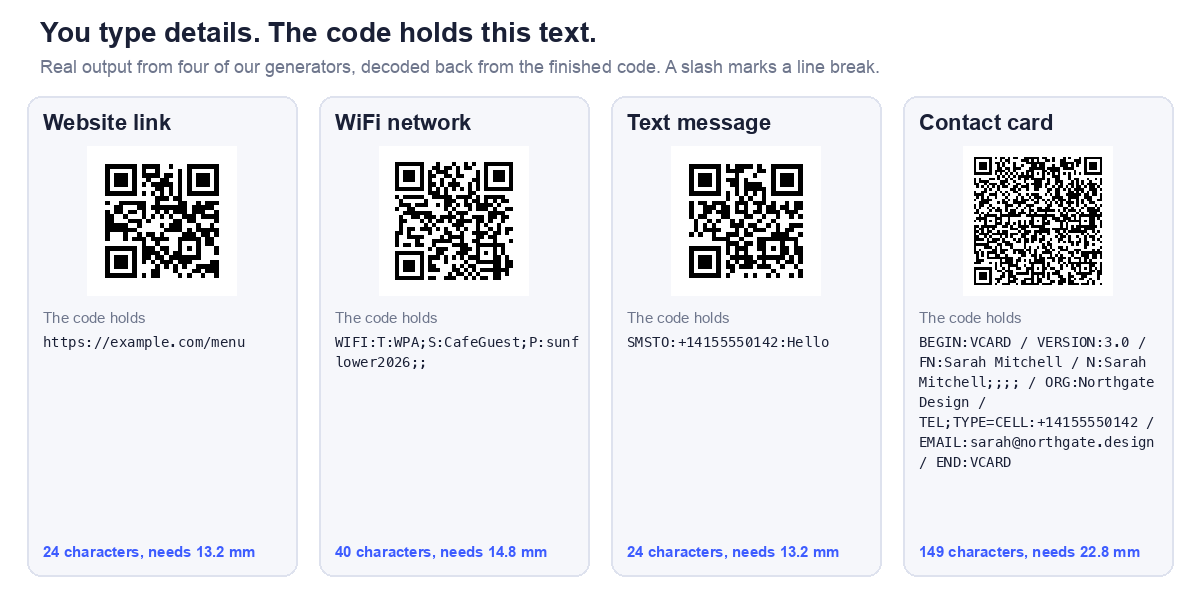
And all nine, with the size each one needs. Print size is the smallest usable width, from a 0.4 mm per module floor plus the quiet margin, at the common error correction level M. These are technical minimums for each grid. In print, never go below about 2 cm, the floor our sizing guide sets for any code.
| Type | You enter | The code holds | Chars | Grid | |
|---|---|---|---|---|---|
| Website link | https://example.com/menu | https://example.com/menu | 24 | 25 x 25 | 13.2 mm |
| Plain text | Table 7 | Table 7 | 7 | 21 x 21 | 11.6 mm |
| WiFi network | Name CafeGuest, password sunflower2026, WPA | WIFI:T:WPA;S:CafeGuest;P:sunflower2026;; | 40 | 29 x 29 | 14.8 mm |
| Contact card | Sarah Mitchell, Northgate Design, +14155550142, sarah@northgate.design | BEGIN:VCARD | 149 | 49 x 49 | 22.8 mm |
| To hello@northgate.design, subject Booking, body Hi | mailto:hello@northgate.design?subject=Booking&body=Hi | 53 | 33 x 33 | 16.4 mm | |
| Text message | +14155550142, message Hello | SMSTO:+14155550142:Hello | 24 | 25 x 25 | 13.2 mm |
| Phone call | +14155550142 | tel:+14155550142 | 16 | 25 x 25 | 13.2 mm |
| Location | an address | https://maps.google.com/?q=412%20Harrison%20St%2C%20San%20Francisco | 67 | 37 x 37 | 18.0 mm |
| Calendar event | title Launch, start and end, location Office | BEGIN:VEVENT | 100 | 41 x 41 | 19.6 mm |
All nine decoded back to exactly the text shown. Two things stand out. The contact card is far longer than anything else, and plain text is the smallest at 11.6 mm. If space on a card is tight, the type you pick changes how large the code has to be.
Anything else: use the text generator
Our text QR code generator writes exactly what you type, line breaks included. We tested it by pasting a multi line contact card, and the code decoded to the identical text. That is how you write a code in a format we have no form for. Remember that a phone only treats it as something special if the text follows the right format, such as the ones in the table. Our guide to how much text fits has the limits.
Step 3: Download it and test it
Download the right file
Download a PNG for screens, email and documents. If the code is going to a printer, use an SVG, which has no pixels and stays sharp at any size. Our custom QR code generator exports SVG and lets you change colours, with a check that the styled code still reads.
Three tests before you print
- Read it back. Open the code in our QR scanner. It shows the text inside, so you can spot a typo before it reaches paper.
- Scan it on a phone and check it does what you meant. For a link, open it in a private window to be sure it works for someone who is not signed in.
- Print one proof, at the real size, and scan that. A code that is too small or low contrast fails on paper even when it works on screen.
For the size to print, our guide to QR code size for print has the numbers, and why QR codes fail to scan covers what goes wrong.
What free means here
What you get
- No account and no signup.
- No watermark on the code.
- Static codes, which cannot expire, because the text is inside the code and nothing sits behind it.
What you do not get
You cannot edit a printed code, and we do not count scans. Those features need a dynamic code, where a company's server sits between the scan and your page. Our guide to static vs dynamic QR codes explains the tradeoff, and why a static code is the safer choice for anything you print in quantity.
Frequently asked questions
Is a QR code writer different from a QR code generator?
No. They are two names for the same tool. Both turn the details you type into a QR code.
Can I write any QR code for free?
You can write any of the types listed above, and anything you can express as text, for free on this site. We do not offer dynamic codes, which need a server behind them.
How long does it take to write a QR code?
About three minutes, including the test. The code itself appears the moment you press Generate.
Can I change a QR code after I have written it?
Not a static one. The text is fixed inside the pattern. If you need to change the destination later, point the code at a page on a domain you own and update the page.
Does a QR code I write expire?
A static code does not. It is a printed pattern holding text, with no account or subscription behind it. Only the page or file it points to can break.
Do I need to install anything?
No. The generators run in your web browser.
Is what I type kept anywhere?
The code is built in your browser, so what you type is not uploaded. You can check this: load a generator page, switch off your internet, and make a code. It still works.