Shelf tags, asset tags, jar labels, sample bags, return address stickers with a link to your shop. Any time you need a lot of QR codes stuck onto things, a sheet of printer labels is the cheapest way to do it.
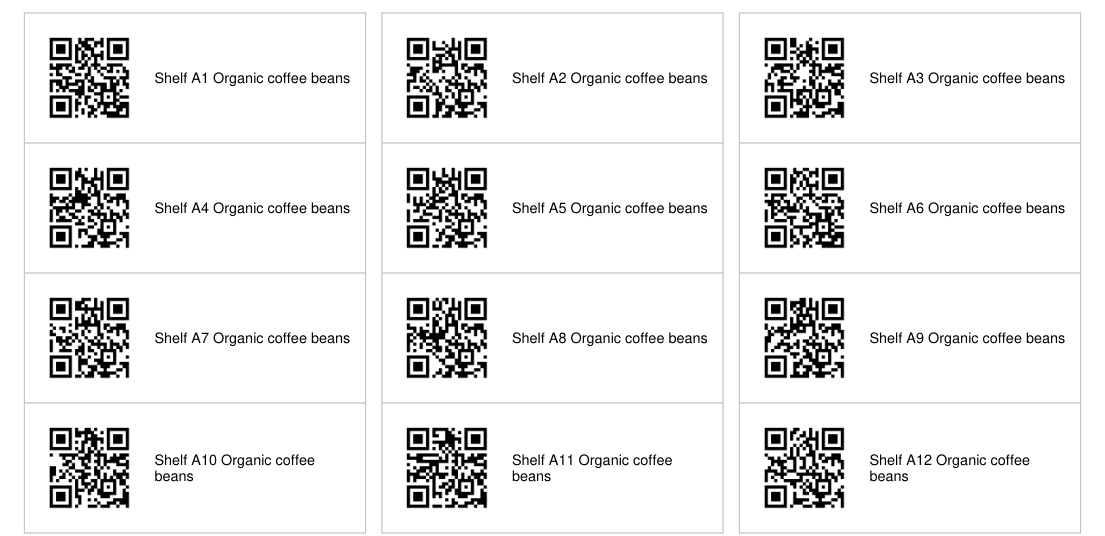
Our bulk QR code generator now lays the codes out on standard US Letter label sheets in the Avery 5160 and 5163 sizes, one code per label, with your text beside each code. It is free, and the whole thing runs in your browser.
Which label sheet to use
| Sheet | Label size | Per sheet | Code size | Longest link (M) |
|---|---|---|---|---|
| Avery 5160 size (also 8160, 5960, 18160) | 1 x 2-5/8 in | 30 | 20.4 mm | 106 characters |
| Avery 5163 size (also 8163, 18163) | 2 x 4 in | 10 | 42.8 mm | over 600 characters |
5160 is the one most people already have. It is the standard address label, so it is in most office cupboards. It gives you 30 codes a sheet, and the code sits just above the 20 mm size we treat as the minimum for reliable scanning.
5163 is the safe choice for anything scanned from further away, such as a box on a shelf, or for long links. The code is more than twice as wide and there is room for two or three lines of text.
Not sure which sheet you have? The template number is printed on the box and usually on the sheet edge.
Make the sheet in four steps
- Open the bulk generator and paste your list, one item per line. To print a name beside each code, write it before a vertical bar:
Shelf A1|https://example.com/a1. - Press Generate all codes and look over the previews.
- Under PDF sheet layout, choose the 5160 or 5163 size.
- Press Download PDF sheet. Long lists carry on to a second sheet and beyond.
If any link holds too much data for the label you picked, the tool tells you how many and what to do about it before you print.
How long can the link be?
A longer link makes a denser code, and on a small label a denser code means smaller squares that a phone struggles with. We measured the longest link that still fits each label, using a rule of 0.4 mm per module with a 20 mm floor:
| Error correction | 5160 size label | 5163 size label |
|---|---|---|
| L, smallest code | 134 characters | over 600 |
| M, the default | 106 characters | over 600 |
| Q | 74 characters | 482 characters |
| H, most robust | 58 characters | 382 characters |
For scale, https://www.example-shop.com/products/organic-coffee-beans-1kg is 62 characters, so a normal product link fits a 5160 label at any setting except H. Tracking links with long query strings are the ones that go over. Our guide to how link length changes a QR code explains why trimming a few characters often makes no difference at all.
For 5160 labels, keep links under about 100 characters and leave error correction on M. If a link is longer, use 5163 labels instead of shrinking the code.
Lining it up before you waste a sheet
Label sheets cost more than paper, so do one dry run:
- In the print dialog, set the scale to 100% or Actual size. "Fit to page" shrinks everything a few percent and the codes drift off the labels row by row.
- Print page one on plain paper.
- Hold it behind a label sheet against a window or a lamp and check that each code sits inside a label.
- Then print onto the label sheet, and scan a few codes from different rows with your phone.
The tool keeps each code 2.5 mm inside the edge of a 5160 label and 4 mm inside a 5163 label, so a printer that is off by a millimetre still lands every code on its label. Published layouts for 5160 differ from each other by under 1 mm across the sheet, which that margin also covers.
One more thing worth doing on a big batch: pad your numbers, so /item/0007 rather than /item/7. Otherwise the codes change size partway down the sheet, which we measured in what goes wrong in a batch of 500.
How we tested this
- 32 links of the form
https://qrotto.com/p/1, plus one 180 character link to trigger the warning, run through the bulk tool in Chrome. - Positions read from the PDF and checked against the label layout. Every code sat at least 2.5 mm inside its label on 5160 and 4 mm inside on 5163.
- Each page rendered at 300 dpi, a common print resolution, cut into label sized pieces, and decoded. All 54 codes on the 5160, 5163 and grid sheets decoded to the right link.
- Link length limits read from the tool's own encoder for every length from 20 to 600 characters at each error correction level.
The honest limit: this checks the files, not ink on label stock. Printers differ, which is why the plain paper dry run above is worth the two minutes.
Common questions
Does this work with Avery 8160, 5960 or 18160 labels?
Yes. Those sheets use the same layout as 5160: 30 labels of 1 x 2-5/8 inches. Likewise 8163 and 18163 share the 5163 layout of 10 labels at 2 x 4 inches. Pick the matching option and print at 100%.
Why does the QR code look small on a 5160 label?
A 5160 label is one inch tall, so the code gets about 20 mm after a small safety margin. That scans fine for short links up to about 106 characters at the default error correction. For longer links, shorten them or use the 2 x 4 inch labels.
Can I print square QR stickers like 2 x 2 inch labels?
Not as a label template yet. We did not find reliable published measurements for those sheets, and a guessed layout would print off the labels. Use the cut-out grid option and trim, or use the PNG zip in your label software.
Do my links get uploaded?
No. The codes and the PDF are made in your browser. Nothing in your list is sent to a server.
Ready to make yours? Open the bulk QR code generator, paste your list and choose a label sheet.